For SaaS products with longer sales cycles, visitors can click on an affiliate’s link today, but only start a free trial the following week. Only a month later, they might finally upgrade to a paid plan. Through all of this, the affiliate who sent them is waiting to get paid.
Affiliate conversion tracking connects that click to the pending payment. The process comes down to three steps: decide what counts as a conversion, specify how it gets attributed and test the setup before you launch it. This guide is written for those running a subscription business and looking for ways to pay affiliates what they’re due.
Key takeaways
- For a subscription product such as a software solution, a billing event (instead of a sign-up) is the conversion.
- There are four attribution routes that can run together: link and cookie, coupon code, tokenless URL and backend reporting.
- The cookie window and first-versus-last click should be treated as payout policies rather than settings.
- Cancellations should stop future commissions, while plan changes will adjust the commission amount.
- Most tracking problems are linked to a stripped parameter or cross-device issue and rarely a broken platform.
What counts as an affiliate conversion?
An affiliate conversion refers to an event (e.g., a click, lead, sign-up, trial start, first charge or renewal) for which you decided to pay partners a commission. For subscription products, a billing event, like a first successful charge or renewal (if you want to reward retention), can hold up under scrutiny because these actions confirm the user has indeed paid.
By contrast, when you use sign-ups, you risk paying for trials that never convert into paying users. Under this rule, the affiliate gets rewarded for volume while you need to absorb the churn.
Whichever action you decide to reward, billing events can happen days (or even weeks) after the click. For affiliates, this means that the conversion will show up only later in their dashboards. Explain this delay to partners upfront so that they don’t mistake pending conversions for tracking faults.
The four ways a conversion gets attributed
A conversion can reach your record through a referral link and its cookie, coupon codes, tokenless landing page URLs or a conversion reported via your backend, each one matching credits to affiliates differently.
You don’t necessarily need to choose only one as all four of these affiliate tracking methods can be used simultaneously. In fact it would be useful as affiliates usually promote in different channels at the same time. For instance, they might use a coupon code on YouTube, a landing page for Instagram and referral links on their own blog. Within each route, give them a separate link per channel: in FirstPromoter, affiliates can create multiple named links with sub-IDs, so you can see whether a conversion came from their newsletter, YouTube or Telegram.
Jerica Bardales, Affiliate Manager at FirstPromoter: “Affiliates usually promote in several channels at the same time: social media, their own website, sometimes even Telegram. That’s why it’s useful for them to use a different tracking link for each channel. It’s the easiest way to keep track of where each conversion actually came from.”
Referral links and cookies
With referral links and cookies, the affiliate’s link is your product’s own URL with a tracking token (e.g., ?ref=partner123) added to the end. The tracking token identifies the promoter, ensuring that referral link is unique.
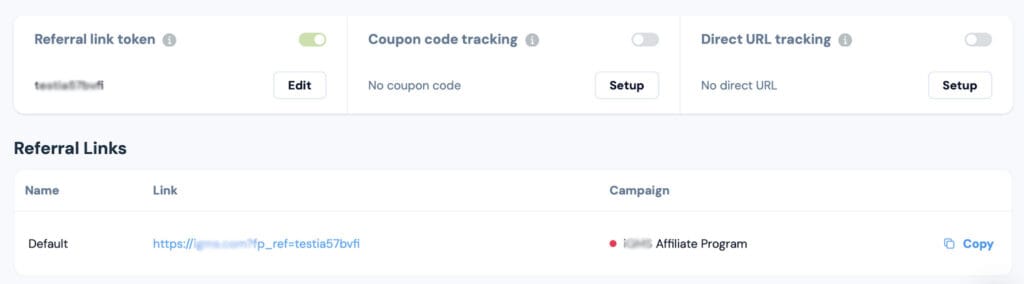
A visitor’s click gets stored in a cookie. Then, if this visitor converts later, the stored click is matched to the conversion and the affiliate receives the credit.
While this is typically the default affiliate link tracking option, it isn’t perfect. Firstly, if the parameter is removed before the web page can load, the click doesn’t get saved and you won’t be able to match it to any conversion, like a billable event, later. Secondly, if a visitor clicks on one device (e.g., a smartphone) but signs up on a laptop, the cookie stays behind on the first device (in this case, the smartphone).
Coupon codes
Coupon codes give each affiliate a unique code which identifies them once a user redeems it. It’s especially popular among creators who use audio (like videos or a podcast) to reach their followers, rely on offline mentions or post where clickable links are limited, like Instagram posts.
The fact that it’s so easy to share (you can just say a code out loud) is also the cause of its major downside. These codes often end up on deal sites and then get redeemed by users with no tie to the affiliate. The issue with this is that your affiliates get credited for conversions they didn’t drive. If you want to go ahead and use this tracking method, watch for this pattern.
It’s equally easy to create. For example, in FirstPromoter, you select the promoter, navigate to “Coupon code tracking”, and create a code.
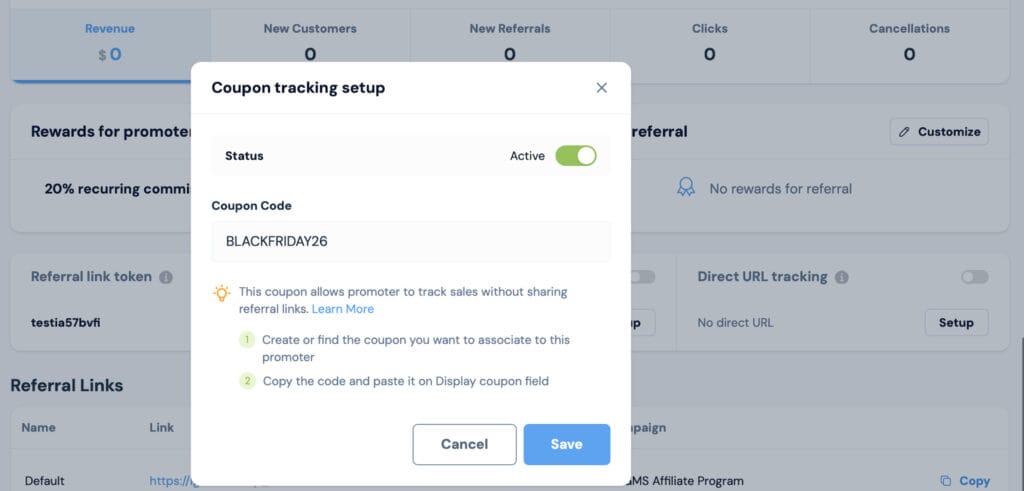
You might need to adjust your approach slightly, depending on the payment platform you use. For example, if you’re using Paddle or Chargebee, you create the coupon codes in the billing tool yourself and FirstPromoter will track them. On Stripe, codes are created and synced automatically, while a platform like Recurly first needs a setting turned on before codes are tracked.
With Stripe, one coupon can also have multiple promotion codes, each assigned to a different affiliate. As such, you set the discount once and give each affiliate their own code.
Tokenless landing page URLs
With this route, a whole landing page gets assigned to one affiliate, usually a company rather than an individual affiliate. For example, a partner agency can point its users to your domain and anyone who lands on that landing page is credited to the agency.
The benefit is that there’s no need to add parameters in links or share codes that need to be remembered so that they can be redeemed at checkout. While it removes these two friction areas, you need to build and host these landing pages. FirstPromoter merely routes the attribution, but doesn’t host the actual landing pages.
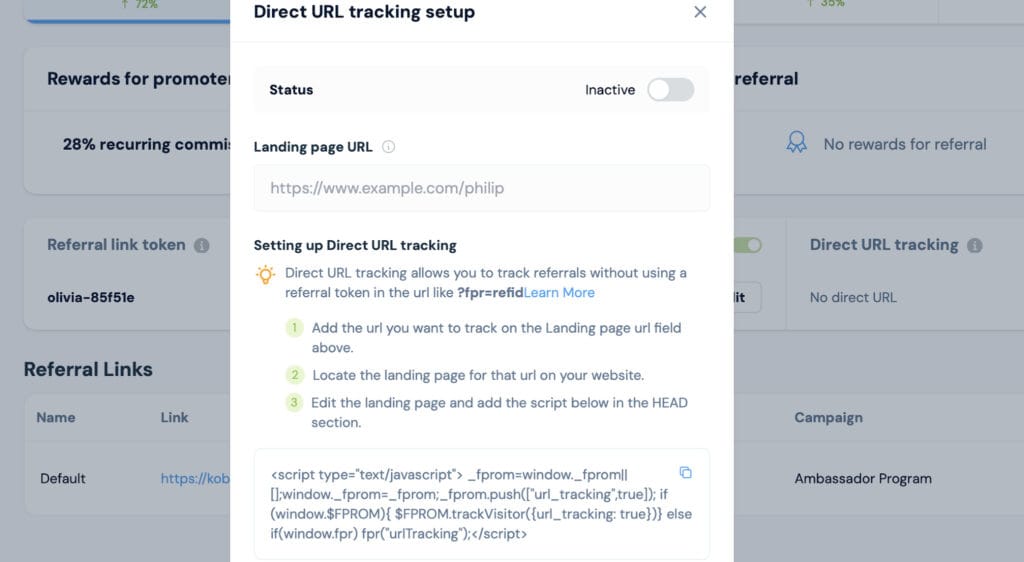
It also doesn’t work for general traffic as the page has to stay dedicated to that specific affiliate. If you redirect general traffic to that page or want to reuse it for one of your own campaigns, every visitor will get credited to the partner.
Reporting conversions from your own backend
Rather than relying on a cookie or coupon code at checkout, your backend is responsible for reporting the conversion. This is how it works: your server posts events, like when a visitor signs up or user cancels, to the tracking API and events are matched to the partner using a referral code, tracked visit ID or promo code.
It’s the route most SaaS companies need for two reasons. Firstly, it survives ad blockers and browser restrictions because nothing depends on the visitor’s browser the moment the conversion is recorded. Secondly, refunds are reported as events, allowing for any commissions linked to the sign-up to be reversed automatically.
Keep in mind that if you skip the fpr.js snippet and rely only on backend reporting, leads and sales still record but clicks don’t, so you lose click data.
Three settings that decide who gets paid
Affiliate platforms typically let details about click attribution, how long clicks stay valid and whether paid ad traffic counts look like configurations when these points actually fall under policy choices. These rarely get revisited until there’s a payment dispute.
How long a click stays valid
Once a visitor clicks an affiliate’s link, the cookie triggers a countdown. This window can be anything from a single day to 9,999 days and is set per campaign each time.
A short window ignores purchases that require more consideration, meaning that the affiliate who introduced a new user gets no reward because the user took a few weeks to decide. Make the window too long and the opposite happens: your affiliates receive credit for the demand your own marketing efforts created.
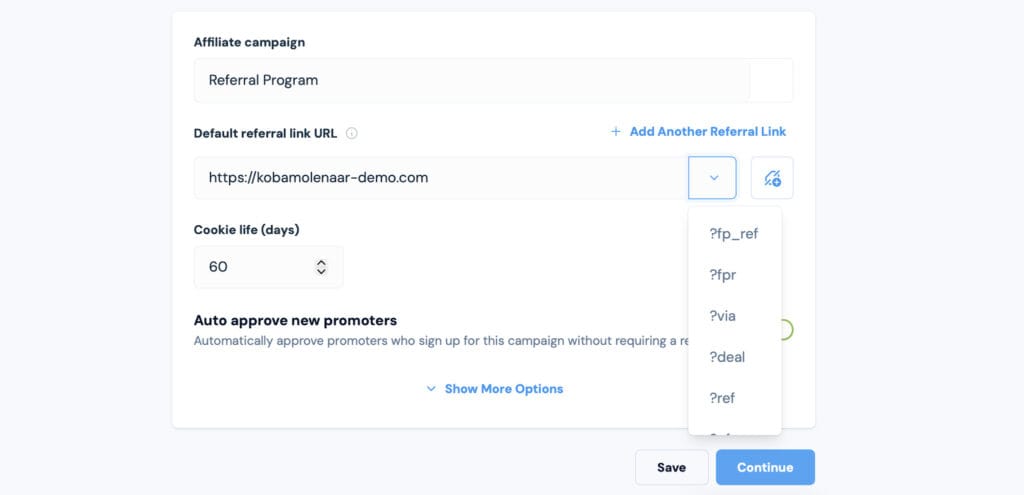
In FirstPromoter, the default cookie window is 60 days and you can change it for each campaign. Sixty days gives enough time for interested parties to complete the trial and evaluate the subscription before purchasing. Anything from 30 days to 90 days for this type of product also falls within a sensible range.
For high-ticket products with long sales cycles, you can even go longer than 90 days. Keep in mind that browsers can cut cookie lifetime short regardless of your setting, so a long window is an intention, not a guarantee.
First click or last click
At some point, two partners will send the same lead your way. For example, a link shared on a software review site might send the first visit and weeks later a YouTube link sends the click that ends in an annual subscription.
When this happens, only one click can claim the credit. The rule you choose to follow will decide how partners can generate an income, making it necessary to include it in your affiliate program’s terms so that affiliates are informed beforehand.
The first click rewards discovery; the last one the closer. Coupon sites tend to win in programs set up for last clicks.
The rule can be configured at campaign level. In FirstPromoter, it’s as easy as switching the toggle to enable first-click attribution (last-click attribution is the default choice).
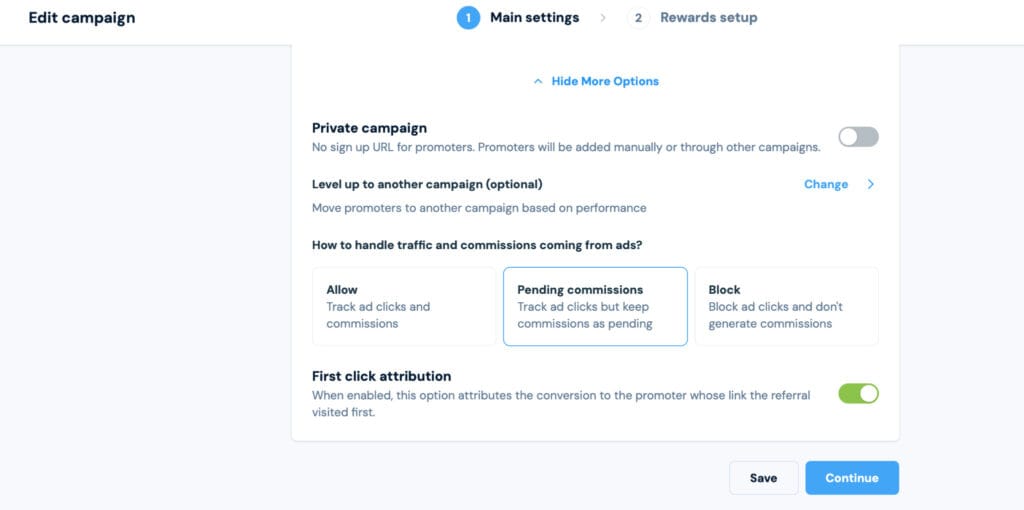
In FirstPromoter, this rule can also be customized per promoter if you have a specific deal that requires a different model. This way, you can run a campaign using last-click attribution but override the rule to first-click attribution for one individual affiliate.
Either way, it means that only one partner will get the credit. In FirstPromoter, every conversion goes to one partner: there’s no multi-touch attribution.
Whether ad traffic counts
Some affiliates don’t wait for your leads to find them. Instead, they buy ads targeting your brand terms. In this scenario, when someone searches for your product by name, the affiliate’s ad is the click that leads to the sale.
Your affiliate program needs to make it clear how you deal with this. You have three options: count it like any other click, hold it for review before approving the commission or block it outright as affiliate fraud. In FirstPromoter, you choose one of these in the campaign settings.
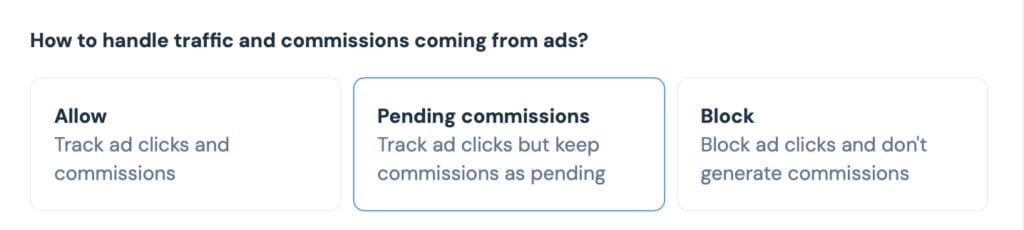
Considering that affiliates running paid ads have already spent money, a rejected commission in this case will cost them actual money, not just their time. Like with first click or last click, ensure that what you allow is also included in your program’s terms.
Tracking a conversion that is not worth anything yet
Unlike in ecommerce, a SaaS sale isn’t a single event. The click can happen on the first day, but days can pass before a user signs up. Next, there’s often first a trial and then only the first payment. Affiliate conversion tracking has to hold across this entire process and correctly connect the payment to the affiliate whose link set it all in motion.
The three sections below cover how to track these conversions to ensure the correct partner receives the credit:
The trial gap
In programs that pay on the first charge, affiliates see the click and the sign-up weeks before they earn anything. This can make conversion tracking appear inaccurate to your affiliates, so your program has to explain the delay upfront. That creates two jobs: keeping the sign-up linked to the affiliate whose link or code started everything and telling affiliates the delay exists.
When the focus is on ensuring conversion tracking works first and foremost, explaining delays can fall through the cracks. The solution is to give affiliates a way of tracking their own progress, whether it’s via a pending status or short note on what needs to happen before payouts, so that they can tell that the tracking indeed works. Without this level of transparency, affiliates can get distracted by opening support tickets instead of promoting your product.
Which billing event pays
Deciding which actions qualify for payment determines how long an affiliate’s work will continue to earn payment. The table below compares the four common options for SaaS products.
| Commission model | How it works | Suited for | Considerations |
|---|---|---|---|
| First charge only | Pays once, on the initial payment | Products where users rarely stay long or when you need clean acquisition | Straightforward to explain and cheap to run |
| First X charges | Pays on a set number of payments | Partners who acquire long-term users | Moderate cost |
| First X months | Pays for a set period of time rather than a number of payments | Products where users switch between monthly and yearly billing | Keeps details tidy across billing cycles |
| Lifetime | Pays on every renewal for as long as the user stays | Very committed affiliate marketers | Most expensive commission model |
To ensure that the affiliate conversion tracking holds up, you can use native integrations with Stripe, Paddle, Chargebee, Recurly or Braintree to handle billing. Integrations with all five of these payment platforms are included in every FirstPromoter plan.
While all track renewals, there are a few caveats to plan around. On Stripe, Paddle and Chargebee, FirstPromoter knows on its own whether a payment is monthly or yearly. However, if you’re using Braintree or Recurly for interval targeting, you set different commissions for monthly and yearly customers and pick the exact billing plans from your billing tool yourself.
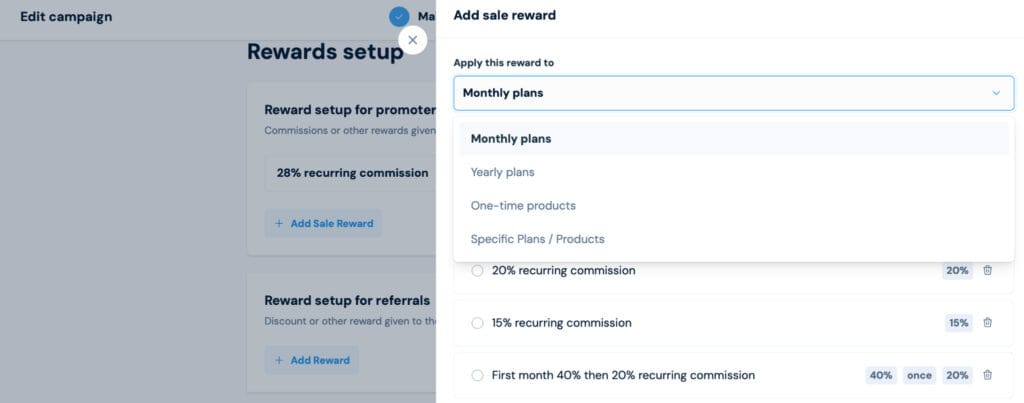
Retroactive commissions are available only with Stripe: FirstPromoter imports your past Stripe history to credit existing referrals.
Refunds, cancellations and plan changes
The nature of SaaS products means that commission that was right when it was recorded doesn’t always stay right. You also need to plan around refunds, cancellations and plan changes.
When a customer gets a refund, the affiliate shouldn’t keep the commission. In FirstPromoter, refunds claw back automatically from the affiliate’s next unpaid payout. A partial refund reduces a percentage commission by the same proportion, while a flat commission is clawed back in full. Braintree is the exception: there, clawbacks are manual.
Cancellations and plan changes are more straightforward. On a recurring program, the commission should end at the same time the subscription does. Then, if a user decides to move to a higher plan, the commission should be adjusted to reflect the new value.
How you implement these rules matter more. They can’t be run manually. Your billing backend should handle refund or cancellation reporting and record any plan updates on its own.
Where tracking actually breaks
Most affiliate conversion tracking failures come down to individual attribution problems, such as a missing parameter or unlinked session. They don’t necessarily indicate a problem with the affiliate platform itself. Your job is to work out which one of the following issues are to blame:
Browser restrictions: Safari’s Intelligent Tracking Prevention (ITP) and similar rules cut the lifetime of cookies, regardless of the window you configured. The practical implication is that a 60-day window can be shortened to merely a week.
Redirect chains and link shorteners: With every redirect, there’s a chance that you lose the tracking parameter. As mentioned earlier, without the parameter, the click can’t get attributed to the right partner.
Cross-device browsing: The referral is stored in a cookie on the device where the click happened. If the person then signs up on a different device, there’s no cookie so the sign-up isn’t credited to the affiliate. Identity at sign-up only helps after the sign-up. From then on, payments are matched to the customer account on any device. This is a limitation. Coupon codes are the workaround, because they credit the affiliate at checkout without relying on a cookie.
Ad blockers: These can block a client-side snippet. Hence, the argument for using backend reporting where your server reports the sign-up or payment directly so that nothing in the browser can prevent it.
Double credit: As flagged earlier, you’ll likely deal with the issue where the same user appears under two partners sooner or later. This is why you need to state in your program’s terms whether first or last click wins the credit.
Self-referrals: With fraud protection, you can flag this issue where partners sign up using their own link. When suspicious sign-ups (or ad fraud) are caught, they’ll get redirected to a review queue. The reason for the flag gets recorded and the commission paused, pending the outcome of the review.
Test the setup before you trust it
There are seven tests that you can run to double-check that your affiliate conversion tracking will hold. To do this, use test partner and customer accounts and check each result before moving to the next task. As these tests can be completed on the same day, there’s no reason to launch your affiliate marketing campaign before you’ve done these checks.
| Test | What to do | What you should see | If you don’t |
|---|---|---|---|
| A click landing and recording | Open the test partner’s link in a clean browser | A click recorded against that partner | The link/parameter is broken. Check redirects and shorteners first. |
| A sign-up attributing to the right partner | After the click, sign up as a new customer in the same browser | The sign-up is recorded under the test partner, marked pending | The cookie isn’t staying valid till sign-up or the sign-up event isn’t reaching the platform. Check the cookie and your sign-up reporting. |
| A trial converting to a first charge and initiating the commission | Move the test user from trial to their first payment | A commission created for the test partner, at the rate and for the billing event you track | The billing integration isn’t reporting payments or the interval doesn’t match your commission rules. |
| A refund reversing commission | Refund the first payment | The commission reversed (except if you’re using Braintree where it’s handled manually) | The billing backend isn’t reporting refunds and so commissions that should’ve been reversed are still paid. |
| A coupon redemption crediting with no click | Redeem the test partner’s coupon on a fresh sign-up with no link click | The conversion credited to the test partner | The coupon isn’t linked to the partner, meaning that coupon-only sales will go uncredited. |
| A click on one device and sign-up on another | Click the affiliate link on your phone, then sign up on your laptop (or vice versa). Run it twice: once with only the link and once with the affiliate’s coupon code | With only the link, the sign-up isn’t credited, because cookies don’t carry across devices. With the coupon code, it’s credited to the affiliate. | If the coupon run isn’t credited, check that the coupon is assigned to the partner. |
| Two partners sending the same user | Click on partner A’s link but use partner B’s link to sign up | Only one partner credited, as per your setting (first click or last click) | Your attribution setting is wrong. |
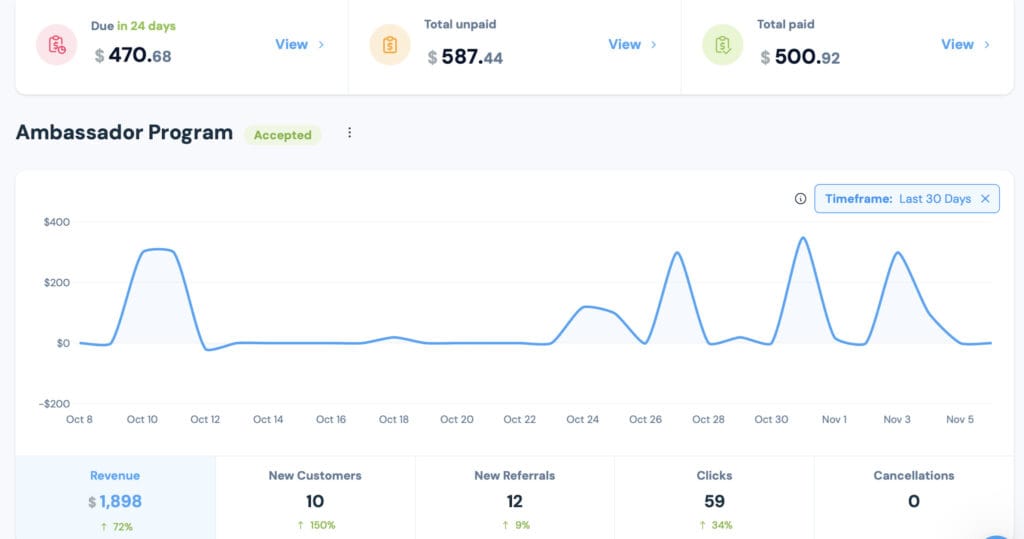
Once the tests are done, open the test partner’s page in FirstPromoter and check that the numbers match what you did: clicks, new referrals, new customers, revenue and cancellations, plus the commissions that are unpaid and due. If a test doesn’t show up here, it didn’t record. To compare against your billing records line by line, export the data to CSV.
Decide the policy, then wire it up
Affiliate conversion tracking problems typically trace back to the same five mistakes:
- Leaving attribution and commission rules out of the program terms
- Paying on sign-up
- Leaving the cookie window at default
- Discovering after a payout that a refund didn’t reverse the commission
- Skipping the tests
So decide the policies first. Write them into your terms and configure your tracking so that you don’t pay for leads that never become revenue and your cookie window rewards good partners with longer sales cycles. Then, run the seven tests.
Ready to see where your affiliate conversion tracking is breaking? Start a free trial and reward affiliates at scale correctly.
FAQ
What is a conversion in affiliate marketing?
A conversion happens when a visitor sent by an affiliate completes the action you want to reward. What counts as an affiliate conversion varies by program and is defined in the agreement. Examples include signing up for a trial, submitting a lead form or renewing a subscription.
How does affiliate conversion tracking work?
Each affiliate gets a unique link or ID and when someone clicks it, your affiliate software records the click and usually stores a cookie in the visitor’s browser. Then, if the visitor later completes the desired action, the conversion gets credited to the affiliate.
What is a good affiliate conversion rate?
Rates vary widely by industry and offer. Keeping this in mind, a good affiliate conversion rate usually falls between 1% and 3%.
Can you track affiliate sales without cookies?
Yes. Coupon codes and backend reporting both credit affiliates without relying on a browser cookie. Backend reporting is the most reliable, because your server reports the conversion directly.
What happens to the commission if the customer refunds?
In most programs, the commission is reversed or cancelled if the customer gets a refund. To handle this rule, commissions are often in a “pending” period before they become payable.

In this article
Newsletter